April 29, 2013 By: Samantha

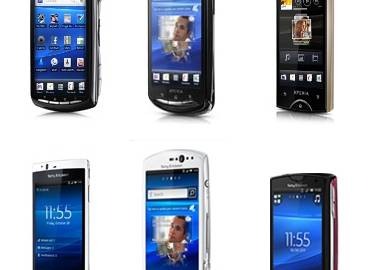
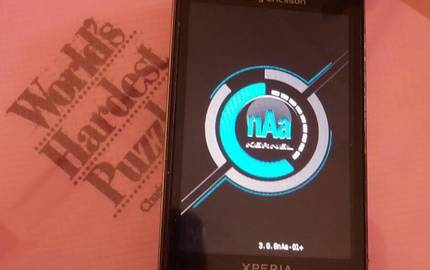
Some devices just refuse to die, no matter how long they’ve been around. That said, a team of devoted developers has come together to bring the Linux kernel 3.0.8 to every 2011 Xperia device. The last official kernel release from Sony (Ericsson) for 2011 Xperia Devices was version 2.6.32.
XDA Recognized Developer nobodyAtall based this kernel on the ‘M7630AABBQMLZA404033I’ CAF tag, which is ‘the latest tagged release for this arch and is linux 3.0.8.’ The supported devices and the developer behind each one are as follows:
The kernel for each of the listed devices is available for download and testing from the kernel thread. The kernels for the Mini, Live with Walkman, Pro and Neo and Neo V are said to be bootable and usable, with near 100% functionality, while the rest are still at various stages of development (at the time of writing). More detailed status for each of these kernels can be found in the discussion thread.
April 3, 2013 By: Samantha

The LED light found on many devices may be the only indication of notifications for many users. The downside is that the LED light, by default, is neither bright nor noticeable—and it could certainly be brighter. Users of the Sony Xperia Arc, Arc S and Pro running CyanogenMod 10 however, are enjoying a significantly brighter LEDs and reaping the benefits of such a simple modification. Sure, those who want brighter LEDs can set custom brightness values through third party apps, but the likelihood of the average user even knowing which particular value is suitable for their specific needs and wants is slim. Thankfully, XDA Forum Member om22 has created a nice little package that rids of all the complications of having brighter LEDs.
Om22 has created flashable Zips for the Xperia Arc, Arc S and Pro that can be conveniently flashed through recovery, resulting in differing LED brightness levels. Working with any stock Gingerbread-based and Ice Cream Sandwich-based ROM of version .587 and .13, three different packages are being offered:
Om22 has assured his users that these LED brightness packages should not damage the LED if used with aforementioned devices, however does not guarantee the same if tried with any other device. He is also taking requests to look into working with other devices.
Xperia Arc, Arc S, and Pro users interested in this modification may want to check out the original thread for more details.
Quick Edit: This mod is now compatible with all 2011 Xperia devices
March 8, 2013 By: egzthunder1

Not too long ago, we started covering how-to guides in the Epic 4G Touch section. These guides aimed to teach users and aspiring developers alike the ins and outs of messing with ROMs internals at the code level, as opposed to simply flashing zip files from recovery. The guides covered a few minor mods (features of TouchWiz ROMs on SGS3) that were mostly for eye candy and some functionality. However, the underlying point of them was not to make your phone prettier (this was the end result). The point was to try and get people to understand the process involved in coding and making tweaks is not as simple as some make it seem.
Taking on a very similar concept, we now jump to the Sony Xperia Arc where XDA Forum Member sandy7 brings us something rather similar. The dev has created a one stop shop thread for mods that can be enabled in the Xperia device. The first tutorial covers a mod that has been ported to virtually every brand of phone out there… music track skipping by using the volume rockers (long press). The dev goes on to discuss and talk about the different parts of code that must be added and modified in order to get this going on the Arc. The following one talks about modifications to the lock screen and the addition of the magnifying glass. Last but not least, the third post covers addition of settings to control things like CPU and panel settings. All these mods will require you to modify the android.policy.jar and whatever APK you are trying to mod, so make sure that you have the necessary tools available to decompile APKs and add the reuqired lines of code to them.
XDA Forum Member jader13254 has also contributed to the thread by adding a guide to make the mods compatible with the newer ICS base (.13). This means that if you know of something that could be included in this master thread, you should definitely drop by and add your share of knowledge to enlighten and motivate others. Lastly, leave your feedback and things you would change if you find easier methods to get to the same end result.
- android.policy.jar
- APKTOOL
- Notepad++
- winrar or 7zip
- and some patience.
You can find more information in the original thread.
Want something published in the Portal? Contact any News Writer.
[Thanks to XDA News Writer jman2131 for the tip!]
December 25, 2012 By: Haroon Q. Raja

Do you have a Sony Xperia Arc, Arc S, Neo, Neo V, Ray, Mini, Mini Pro, Active, Pro, Live with Walkman, or another similar Xperia series device from 2011? Why not add a whole bunch of goodies, including a feature-loaded Smart Settings app and AOSP-style lock screen? We’ve got just the right mod for you. XDA Senior Member gagan.u20 initially built this mod for his Sony Ericsson Xperia Neo V, and has now shared it with us for all the aforementioned devices running a rooted stock ROM or a stock-based custom ROM.
The Smart Settings part of the mod offers CPU control, location-based Wi-Fi settings, Sony Bravia Engine 2, tabbed SystemUI with preferences for status bar customization, and the developer’s own lock screen style. And for those would prefer a different experience, you can also easily switch between AOSP-style and Xperia T-style lock screen.
So what are you waiting for? Head over to the forum thread, read the instructions, and start customizing your Xperia to your heart’s content!
Update: Please also visit this thread for the Xperia Neo by XDA Recognized Contributor Pandemic, which predates the efforts from gagan.u20 and may serve as an alternative for those running the device.
September 21, 2012 By: Joseph Hindy

When it comes to multi-device releases, it doesn’t get much more straightforward than a widespread Sony Xperia release. Given how close the hardware and software is between devices, it isn’t overly difficult to get a single piece of software working on a number of devices. As such, unofficial AOKP Jelly Bean was ported to 14 Sony Xperia devices practically all at once.
XDA Recognized Contributor championswimmer, on behalf of the KangXperiaProject, brings us the ROMs. However, many thanks go to the FreeXperia Team, whose work was critical to the achievement. In championswimmer’s words:
It is very important to mention here that nothing, yes i repeat NOTHING was possible without the awesome work done by FreeXperia team for the community. For all 2011 devices we are using their device trees almost untouched. So all the hardware work (making camera, sensors, gralloc, hardware acceleration etc work flawlessly) is purely the credit of FreeXperiaTeam (FXP, bin4ry, defer and Kali- ) If there is anyone whom you really need to thank for Xperia devices being able to run CM9/AOSP/AOKP/MIUI or whatever non-stock ROMs it’s the great people like : ZdZihu, FXP, Bin4ry, defer, Kali-, KeiranFTW, DoomLord, Androxyde, Achotjan, Azuzu and many many more. The only thing that KXP team has done is made the devices and vendor trees fit into the groove of AOKP source tree and manage a buildable environment. Our contribution in KXP ROMs is much much less as compared to the contribution of Team Kang and Team FreeXperia. (Ofcourse on older devices we had to work a lot becuase FXP does not support them anymore)
The functionality varies depending on device. However, there aren’t more than two or three things broken per device, and none of it is bad enough to be considered unstable. In addition to releasing the ROMs for all these devices, KXP has also written up a nice tutorial showing users how to download and compile their own source code. So if users want to grab the latest and greatest or just tinker around, it is available. Do be advised, the tutorial for compiling is for 64-bit Ubuntu, and will require at least 10GB of disk space.
If you’d like to know more and see the full list of supported devices, check out the original thread.
August 22, 2012 By: jerdog

Sony has been one of the most proactive handset manufacturers as of late in releasing updates to their Android handsets, as we reported earlier this year. Now they’re rolling out firmware updates for the Xperia arc, Xperia arc S, Xperia neo, Xperia neo V, Xperia mini, Xperia pro, Xperia active and Xperia ray beginning this week. They had this to say on their Xperia Blog:
Starting from this week, Xperia arc, Xperia arc S, Xperia neo, Xperia neo V, Xperia mini, Xperia pro, Xperia active and Xperia ray will receive a new Ice Cream Sandwich software update that comes with bug fixes, performance tweaks and other improvements.
Xperia mini pro, Xperia neo L and Live with Walkman are next up, and will start to receive their serving over the next few weeks.
If you’ve already upgraded to ICS, you’ll receive a notification in your phone and be able to download it over-the-air. For those guys on Gingerbread, you’ll need to plug in and upgrade using PC companion or Bridge for Mac. For more information, please visit http://www.sonymobile.com/update.
As is always the case, you stand to lose root on your device with these updates if you’ve already applied a custom ROM. So if that is important to you (and why wouldn’t it be?) you can wait for the talented developers on XDA to provide a solution for you.
August 2, 2012 By: Joseph Hindy

The Sony Xperia line up has been rather busy in recent weeks. With the Xperia S lock screen being ported to five other Xperia devices and ICS AOKP getting ported to 16 Xperia devices, users have had a lot to do with their Xperia devices. The trend doesn’t seem to be stopping any time soon, as over half a dozen Xperia devices now have CM10 ports. Specifically, the Sony Xperia Ray, Sony Xperia Neo/NeoV, Sony Xperia Arc/Arc S/Pro, and the Xperia S.
Normally, there would be a laundry list of developers responsible for a laundry list of CM10 releases like this. That is not the case this time. XDA Recognized Developer FXP is actually responsible for all of them. In fact, FXP has released all the CM10 ROMs in the same threads as the CM7 and CM9 releases, making CyanogenMod really easy to find for these devices.
As expected, they are alpha builds. This means that there are bound to be bugs in each ROM—some of which may not be that bad, but a few could be deal breakers for now. While there isn’t a list in the thread that lists the bugs, users can use FXP’s bug tracker for each ROM to find out exactly what’s wrong. Users have reported that at least network, WiFi, camera, and a few other basic features indeed work. While it may not be great for daily use, it’s definitely stable enough to enjoy.
For download links and change logs, check out the corresponding links below.
July 27, 2012 By: Joseph Hindy

Sony Xperia development is a whirlwind of sharing and porting. There seemingly isn’t anything released on any given Xperia device that isn’t eventually ported to the other Xperia devices. From the launcher, to apps, and many other things, the Sony Xperia line is the epitome of developmental sharing. That said, the Sony Xperia Arc as well as the Sony Xperia Mini, Mini Pro, Active, and Ray have all received a port of the Sony Xperia S lock screen.
XDA Senior Member AeonWorld ported the lock screen to the Xperia Arc. A few days later XDA Senior Member ThilinaC ported the mod to the Mini, Mini Pro, Active, and Ray. However, during that port, ThrilinaC also added a mod to customize the app shortcuts on the lock screen. This mod was then brought back to the Xperia Arc. Awesome.
For all the devices, the mod is pretty simple to apply. Just download the appropriate file and flash in custom recovery. The mods are only compatible with the stock ROMs at this time, so if you want to check it out you may have to roll back to rooted stock, although it’ll likely be added to custom ROMs in due time.
For additional information, hit up either the Xperia Arc thread or the Xperia Mini, Mini Pro, Active, and Ray thread.
Update: This awesome modification is also available on the Xperia Neo and Neo V thanks to the work of XDA Recognized Contributor Pandemic and XDA Forum Member x_one. You can find their work in this thread.
May 30, 2012 By: Joseph Hindy

Developers, start your engines. Or your computers. Or whatever you need to start to get ready to develop things. It seems that with every release of a new Xperia device, that device is immediately stripped down and ported to every other Xperia device out there. This is interesting both because of the inherent difficulties in porting proprietary components and also because when something new is released, everyone gets something new. And for anyone looking forward to checking out everything the Xperia Pro has to offer, you’re in luck.
XDA Senior Member ameer1234567890 has leaked the latest ICS firmware goodness for the purposes of development. The firmware is for developers only, so attempting to flash this without modification on your device will not work. The release also includes the kernel and the ramdisk as well. The full package includes:
This is the latest ICS build for Xperia Pro from EMMA – SE external testing software.
It’s of use only for developers, as it’s boot, system, etc packaged into one file (there is
info around on how to unpack it) and by default it can’t be flashed on non-brown (not
developer) phones.
For additional information, head over to the original thread.
March 27, 2012 By: Joseph Hindy

With the release of the Sony Xperia S, the Xperia S UI and applications have been making their rounds to the other devices in the Xperia lineup. For those Xperia users who don’t have some Xperia S love yet, just be patient. It’s probably coming.
For those holding on to their Sony Ericsson Xperia Arc, your patience has paid off. XDA Forum Member pajoneer has released a self proclaimed big mod pack that includes a lot of goodies with many goodies coming from the Xperia S.
The mod is easy to install. Simply flash in ClockworkMod recovery and you’re off to the races. As the name implies, the mod pack is pretty big and includes a number of fun features including:
mega bass
beats audio
music player from Xperia S with equalizer
cosmic flow live wallpaper
reboot option
statusbar widgets
Xperia S Home.apk 5×4 with rotation! (icon font fixed)
Xperia S clock widget pack
With several more mentioned and even more that aren’t mentioned, the mod brings an all-in-one type feel to making the Arc feel and act more like an Xperia S and adding some other fun features as well.
For additional details, screen shots, and download links, please visit the modification thread. As usual, make a backup before flashing. You never know when something might go wrong, and you’ll need to restore a Nandroid to fix it.
March 9, 2012 By: Joseph Hindy

Some of the most underrated modifications that developers make are the status bar widget modifications. Being able to pull the status bar down and change everything from 2G and 3G (on some phones, even 4G), turning Bluetooth and WiFi on and off and even having a flashlight toggle.
XDA Senior Member hansip87 released a modification for the Sony Ericsson Xperia Ray that gives Ice Cream Sandwich users a 15-button status bar. The developer is also adapting the mod for the Sony Ericsson Xperia Neo and the Sony Ericsson Xperia Arc. The modification is pretty simple and actually includes more than one mod. Not only is there a 15 button status bar widget included, but it also includes a 6-in-1 mod, specifically for ICS. If it is anything like the 10 in 1 Gingerbread Mod for the Xperia Ray, users can expect to see features like 2G/3G toggling, Bluetooth and WiFi toggles and even a flashlight toggle.
The mod, while still available for use, still has a few things to work out before the final version is released. According to the developer:
In ICS the mod is reduced to 6, since some mod is unapplicable, already inside ICS, or already merged to other mod (e.g. 15 button in status bar widget). So the only thing left is:
1. 30 step Volume
2. Reboot Menu
So for anyone who’s wanting some modified goodness for their Ray, they can check out screenshots and download links in the original thread. For Arc and Neo users, you’re still on the wait list, but launch threads have been set up for the Neo and the Arc so keep your eyes peeled there for releases. As always, don’t forget to make those backups before flashing anything.
March 6, 2012 By: Joseph Hindy

For most people, being able to change the number of home screens on their Android devices requires getting an aftermarket launcher application, such as ADW.Launcher or LauncherPro. However, some people enjoy the stock launchers that come on their phones, and would rather be able to customize it than replace it entirely. For those carrying the Sony Ericsson Xperia Arc, you can now literally crank it up to 11. Pun squarely intended. XDA Senior Member vr5411 has created a thread that has produced mods that will allow anyone with the Xperia Arc to choose how many home screens they want—from 3 to 11.
The modifications are actually modified home.apk files that can be put onto the device and installed like any other apk, so there’s very little risk and it’s very easy to do. The developer has also been kind enough to post an original home.apk for anyone who wants to revert back who forgot to make a backup.
If you’d like to change the number of home screens on your stock launcher, head on over to the original thread, where you can find download links for 3, 5, 7, 9 and 11 home screen configurations, additional information and screen shots.
February 26, 2012 By: Joseph Hindy

For the unaware, there is a bug for some Sony Ericsson Xperia phones—namely the Xperia Neo and the Xperia Arc—which causes the battery gauge to misread the charge as 0%. Though there is no inherent danger, the bug is still annoying. The bug primarily appears when users downgrade from 2.3.4 to 2.3.2. XDA Senior Member Bazoocaze has posted a workaround for the Neo and Arc to make the 0% bug a thing of the past.
FuelGaugeApp fixes the 0% bug and gives users accurate battery monitoring. Using it is very simple—just install it like you would any other 3rd party apk. The patch has also been integrated into several kernels, some of which are ICS friendly. Despite the ease of use, the method itself is a little convoluted and it’s very highly recommended that anyone who attempts this read the detailed FAQ featured in the Xperia Arc thread.
To alleviate the 0% blues, visit the Xperia Neo and Xperia Arc threads.