
latest
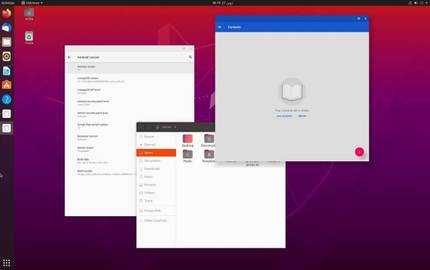
WayDroid can run Android apps on Linux without slowdowns
There are many ways to run Android apps on desktop PCs, but a new solution called WayDroid looks to be the best option for Linux machines.

There are many ways to run Android apps on desktop computers. Desktop emulators like BlueStacks are popular, you could run Android x86 in a virtual machine (or dual-boot it), or you could wait for Windows 11's Android app compatibility layer. Anbox is another solution for running Android apps, intended to support Linux and Linux-based smartphones, but it suffers from slow performance on low-power devices. Now there's another project that aims to bring Android apps to Linux devices, but without the slowdowns and jank commonly found with Anbox.
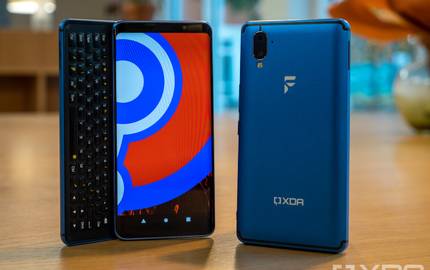
Yeah, XDA made a phone and it's only available for 6 weeks!
We here at XDA have collaborated with F(x)tec to bring you our first smartphone. Meet the Pro1-X, a phone that can run LineageOS or Ubuntu.
There have been many rumors and running jokes over the years that XDA would, and probably should, make a phone. Our history with alternative platforms such as LineageOS (and CyanogenMod that came before it) has meant that XDA has been at the forefront of helping develop viable alternatives to the primary platforms available on smartphones.

UBports GSI brings Ubuntu Touch to any Project Treble-supported Android device
XDA Recognized Developer erfanoabdi has compiled an Ubuntu Touch GSI that can be installed on any Project Treble compliant device.

The ability to boot an AOSP Generic System Image (GSI) on a compatible Android device is one of the best outcomes of Project Treble, but a similar achievement has yet to be made in the domain of generic kernel development. Google does mandate a minimum Linux kernel version requirement with each new release of Android, but you still can't simply flash a generic ARM Linux distribution on your Android smartphone and expect it to work due to the fact that the majority of the Android devices are not using a mainline Linux kernel. There exists a community-driven project named UBports that aims to bring Ubuntu Touch (a mobile version of the popular Ubuntu Linux distribution) to Android devices, but their device support is fairly minimal to date.

Developer ports Ubuntu Touch to the Xiaomi Redmi Note 7
Xiaomi Redmi Note 7 has received a port of Ubuntu Touch, courtesy of XDA Recognized Developer erfanoabdi. Read on to know more about this port!
There was a time when you could slap any operating system on the mythical HTC HD2, be it Android, Ubuntu, or even Windows RT. The Samsung Galaxy S III and Galaxy Note II are gradually taking up that mantle, as it is possible to install regular GNU/Linux distributions on them with very little effort. While you can satisfy the urge of having a "true Linux phone" by getting the Librem 5 or PinePhone, their hardware configurations are unfortunately dated. Several community-driven projects, such as UBports and postmarketOS, are trying to bridge the gap between regular consumer Android devices and mainstream Linux distributions, and Project Halium plays a huge role in this development scene. Now, XDA Recognized Developer erfanoabdi has decided to dip his toe in this particular domain, as he has ported Ubuntu Touch to the Xiaomi Redmi Note 7.
Halium is an Open Source Project Working Towards a Common Base for Non-Android Mobile Operating Systems
Project Halium is an open source project that aims to build a common working base for all non-Android, GNU/Linux based operating systems.
If you are an Android enthusiast who has also explored beyond the world of purely Android-based custom ROMs, you have probably heard of projects such as Ubuntu Touch, Sailfish OS, and the like.

Dual Boot on Android: A Power User's Holy Grail?
Is dual booting Android worth it? What are the options to do so? In this thread we discuss why dual booting is a power user's jewel & how to get it going!
Many of you probably dual-boot your personal computers, be it to run Linux alongside Windows or because you have a Mac and hate OS X. On a computer platform, the process can be a life-saver for a variety of reasons, particularly software compatibility/integration. It’s not rare to see computer programmers with Linux partitions or Mac gamers that use bootcamp for their videogames. On computers, the process has gotten relatively simpler over time, with Microsoft and Apple typically supporting the notion. On Android, the story is different.

Last week, XDA Developer TV Producer Jordan showed us how to work with developing an app in the upcoming Ubuntu Touch OS. Of course, developing an App for a device or operating system is always easier if you have a device to test it on. Luckily, Google released a new version of the Nexus 7, and the market is full of old Nexus 7s you can pick up for cheap.

A couple of months ago, Ubuntu Touch was unveiled for mobile devices to much hype and excitement. Along with the announcement, a handy porting guide and accompanying source code were introduced to the members of the dev community who were interested in testing the developers preview of the device. The porting process turned out to be somewhat similar to building a CM10.1-based Rom.

Recently we mentioned that Canonical would be releasing their mobile device operating system, Ubuntu Touch. Well, true to their word, and unlike some other releases from other companies, it is live today. If you have a Galaxy Nexus, Nexus 4, Nexus 7, or Nexus 10 and an Ubuntu desktop you can experience Ubuntu’s mobile offering.